




















































BLOG

CRM Data Rot Is Costing You Deals: How Stale Records Kill Pipeline Growth 

CRM data rot weakens pipeline with outdated contacts, invalid emails, and stale company data. Fresh B2B data helps GTM teams improve deliverability, routing, and revenue performance.


Published on: July 3, 2026 |

Share:

CRM data rot weakens pipeline with outdated contacts, invalid emails, and stale company data. Fresh B2B data helps GTM teams improve deliverability, routing, and revenue performance.

What is CRM data rot?  

CRM data rot is the gradual decay of contact, company, and account records inside your CRM. It happens when people change jobs, emails become invalid, titles change, companies restructure, and records stop reflecting reality. Left unchecked, it quietly damages outreach, forecasting, routing, and pipeline growth. 

There is a slow leak running through most B2B sales organizations, and it is not the kind that shows up on a revenue dashboard until it is already expensive. It does not announce itself with a warning or trigger an alert in your CRM. It simply accumulates, record by record and quarter by quarter, until one day your pipeline looks full, your sequences are running, and your SDRs are working hard, but the deals are not closing at the rate they should be. 

That leak has a name: CRM data rot. And for most GTM teams, it is far more widespread than leadership realises. 

Research consistently shows that B2B data decays at a rate of 20 to 30 percent per year. For a CRM that was last thoroughly cleaned 18 months ago, that means a third or more of your records may contain at least one material inaccuracy: a wrong email, an outdated title, a contact who has moved companies, or a phone number that no longer connects to the right person. Every one of those inaccurate records is still sitting in your CRM, looking legitimate, silently corrupting the work that flows through it. 

This blog covers what CRM data rot actually is, how it develops, where it shows up in your revenue process, and what GTM teams can do to stop it from killing pipeline growth before it compounds further. 

Here’s the short version of what follows: before we go deep on the mechanics, the damage, and the fix. 

Key Takeaways box 

CRM Data Rot in 30 Seconds: 

  • Contact data decays roughly 20–30% annually. HubSpot, citing MarketingSherpa research, estimates a decay rate of approximately 22.5% per year. 
  • Higher data decay increases email bounce rates and can damage sender reputation.  
  • Gartner estimates that poor data quality costs sales representatives approximately 27% of their potential selling time. 
  • Stale CRM data distorts lead routing, pipeline forecasting, and resource planning. 
  • Continuous CRM enrichment, rather than a one-time cleanup, is what prevents pipeline leakage over the long term. 

What Is CRM Data Rot? 

CRM data rot is more than outdated contact information. It is the gradual erosion of the accuracy and reliability of every record your revenue team depends on. Unlike a one-time data quality issue, CRM data rot is continuous, driven by job changes, company restructuring, email migrations, and other natural business changes.  

According to HubSpot’s data decay benchmarks (based on MarketingSherpa research), B2B contact databases decay at roughly 2.1% per month, compounding to approximately 22.5% annually. This means that even a well-maintained CRM can become significantly less accurate within a year if records are not continuously verified and enriched. 

People change jobs. Companies get acquired. Email domains migrate after mergers. Executives get promoted into roles with different titles, different budgets, and different buying authority. New offices open in different regions. Companies downsize, restructure, or pivot their focus entirely. Every one of these changes creates a gap between what your CRM says and what is actually true about that person or organization today. 

CRM data rot is also sometimes called CRM data decay, and the two terms are used interchangeably in RevOps and sales operations conversations. The distinction worth drawing, if any, is one of framing: data decay describes the technical phenomenon of records becoming inaccurate over time, while data rot more vividly captures the organizational consequence. It conveys the idea that something that once had value is now actively harmful if left in place. 

Because CRM data rot develops gradually and invisibly, it is easy to underestimate its impact. Unlike a sudden system outage or a visible campaign failure, data rot does its damage quietly, through slightly lower reply rates, slightly higher bounce rates, and slightly worse conversion at each stage of the funnel, until the cumulative effect becomes impossible to ignore. 

Why CRM Data Decay Is a Pipeline Problem, Not Just a Data Problem 

Sales and RevOps teams sometimes treat RevOps data quality as an operational concern, something for the data team to fix in the background, rather than a revenue concern that deserves leadership attention. That framing is worth challenging directly. 

Every record in your CRM that is inaccurate represents a broken revenue pathway. CRM is a contact who will not receive your outreach because the email bounces. It is a sequence that runs to completion without a single response because the person in that role changed four months ago. CRM is a lead routing rule that sends a high-intent account to the wrong sales rep because the company headcount data is outdated, and it was misclassified as SMB when it is now mid-market. 

CRM data rot does not just create administrative waste. It creates sales pipeline leakage. These are deals that should have started, that would have started if the data were accurate, but that never made it into the funnel because the outreach never landed or landed in the wrong place at the wrong time. 

The compounding nature of this problem makes it particularly important to address proactively rather than reactively. Bad data today degrades deliverability, which damages sender reputation, which makes tomorrow’s outreach to good contacts less effective. Inaccurate lead routing today creates confusion about account ownership, which leads to internal friction tomorrow when two reps are pursuing the same account from different angles. Stale forecasting data today produces strategic decisions about hiring, capacity, and GTM investment that are built on an inaccurate picture of pipeline reality. 

In other words, CRM data rot is not a database problem. It is a revenue problem. 

How CRM Records Become Stale Over Time 

Understanding the specific mechanisms of CRM data decay helps GTM teams prioritise where to focus their data hygiene efforts. The rot does not happen uniformly across all record types. Some types of records decay faster, and some causes of decay are more operationally damaging than others. 

1. Job Changes 

The most common and most damaging source of CRM data rot is job changes. When a contact in your CRM moves to a new employer, they take their buying authority, their relationships, and their context with them, but your CRM still associates them with their old company. Their email no longer works. Also, their direct dial either goes dead or gets reassigned to someone else. Their name is still on your target account list for a company where they no longer work, while their new employer, who might now be a better-fit prospect, is not in your system at all. 

Industry estimates suggest that somewhere between 25 and 30 percent of professionals change employers in any given year. For the high-growth technology, SaaS, and professional services sectors that most B2B outbound motions target, that figure may be even higher. In a database of 50,000 contacts, that could mean 12,000 to 15,000 job-change-driven inaccuracies per year, even before accounting for any other source of decay. 

2. Promotions and Role Changes 

A contact who stays at the same company can still produce stale CRM data. A VP of Sales who becomes CRO now has different budget authority, different strategic priorities, and a different scope of decision-making. A Head of Engineering who moves into a General Manager role is now a fundamentally different buyer. A Marketing Manager promoted to Director of Demand Generation now owns a budget she did not own before. 

These internal transitions matter for personalization, for sequence strategy, and for how your team frames the conversation. A rep who reaches out, treating a newly promoted CRO as a VP of Sales, is starting the conversation in the wrong register, and the prospect will know it immediately. 

3. Company Restructuring 

Mergers, acquisitions, divestitures, and internal reorganizations all produce waves of CRM data decay. When two companies merge, email domains often migrate, reporting lines change, titles get consolidated or eliminated, and budget ownership shifts. When a company does a round of layoffs, a meaningful percentage of your contact records at that account may become invalid overnight. 

Company restructuring is particularly disruptive because it affects multiple record types at once, including contacts, accounts, and company-level fields like headcount, industry classification, and technology stack. It often happens faster than any manual update process can track. 

4. Email and Domain Changes 

Even when a person stays in the same role at the same company, their email address can change. Acquisitions are the most common driver: when Company A acquires Company B, Company B’s staff typically migrate from their old domain to the acquirer’s domain. A contact who was reachable at firstname@companyb.com may now only be reachable at firstname.lastname@companya.com, and your CRM will not know this unless it is being actively enriched. 

Domain migrations can invalidate large batches of contact records simultaneously, making them one of the higher-impact sources of sudden CRM data rot. A single acquisition in your target market can degrade the accuracy of hundreds of records at once. 

5. Duplicate and Incomplete Records 

Duplicate records are a structural form of CRM data rot rather than a decay-driven one, but their impact on data quality is significant. When the same contact or account appears multiple times in your CRM, often as a result of multiple import sources, inconsistent data entry standards, or merges gone wrong, it creates confusion about account ownership, double-counts pipeline contributions, and makes it impossible to get a clean view of a relationship’s history. 

Incomplete records are similarly damaging. Contacts missing email addresses, phone numbers, titles, or company data represent records that look legitimate but cannot actually be acted on without additional research. They create the impression of database coverage while hiding gaps in usable data. 

6. Unverified Third-Party Data Imports 

Many CRM data quality problems originate not from natural decay but from the initial data import. When GTM teams bring in large batches of contacts from third-party data providers, trade show lists, content download forms, or partner databases, those records enter the CRM with varying levels of accuracy and verification. If the import process does not include a verification step, bad data enters the system at scale and sits there, indistinguishable from records that were carefully sourced and validated. 

Unverified imports are a compounding problem because they establish a false baseline. The CRM looks full and comprehensive, but a meaningful portion of that apparent coverage is built on records that were never accurate to begin with. This is not a niche issue. According to Dun & Bradstreet research, 91% of CRM data is incomplete, stale, or duplicated, highlighting how even widely adopted CRM environments struggle with maintaining reliable, high-quality data over time. 

The Hidden Ways Stale CRM Records Kill Pipeline Growth 

CRM data rot shows up in some obvious places, like bounced emails and disconnected phone calls, but its most costly effects are often the ones that do not show up on a report. Here is a detailed look at where stale records do their damage. 

1. SDRs Waste Time on Bad Contacts 

Time is the scarcest resource in outbound sales, and CRM data rot is one of the most significant drains on SDR time that most organizations fail to measure. When an SDR opens a sequence, dials a number, or writes a personalised email, they are investing in that contact. When the contact is no longer at the company, the email bounces, or the number connects to the wrong person, that investment returns nothing. 

Beyond the individual wasted touchpoint, there is the downstream time cost. The SDR needs to investigate what happened, update the record, find the correct contact, verify the new information, rebuild the outreach, and re-enroll in a sequence. A process that should have taken two minutes (sending a follow-up) turns into twenty minutes of data archaeology. 

Multiply that across a team of ten SDRs working a database with 25% data rot, and the aggregate productivity loss is substantial. The business impact of poor data quality extends far beyond individual teams. Gartner estimates that poor data quality costs organizations an average of $12.9 million per year, while sales representatives lose approximately 27% of their potential selling time, around 546 hours annually, chasing inaccurate contacts and resolving data issues. In many organizations, this translates into hours each week spent updating records, verifying contacts, and correcting CRM inaccuracies instead of generating pipeline. 

2. Email Bounce Rates Increase 

Hard bounces from invalid email addresses are one of the most directly measurable consequences of CRM data rot and one of the most consequential. Every hard bounce is a signal to the internet’s email infrastructure that you are sending to addresses that do not exist. Accumulate enough of these signals, and your sending domain starts to develop a poor reputation with major inbox providers. 

Once domain reputation degrades past a threshold, your emails begin landing in spam folders. This applies not just to the ones going to invalid addresses, but to all of your emails. A rep who has researched a prospect carefully, written a personalised message, and timed their outreach appropriately may still find that their email never reaches the inbox, because earlier campaigns sent to stale CRM records have flagged their domain as unreliable. 

This is the compounding damage of CRM data rot: bad records degrade the infrastructure that delivers your outreach, making every subsequent campaign less effective than it should be, even campaigns built on clean and verified contacts. 

3. Personalization Becomes Inaccurate 

Modern B2B buyers are sophisticated about outreach. They know the difference between genuine personalization and a mail-merge that swaps in a first name. And they know immediately when the personalization is wrong: when the email references a role they left eight months ago, when it mentions a company initiative that is no longer relevant, or when it congratulates them on a promotion that happened fourteen months ago. 

Wrong personalization is worse than no personalization. It signals that the sender has not done their homework, that they are not paying attention, and that the relationship is built on an inaccurate picture of who the buyer actually is. For a rep trying to establish credibility and open a genuine conversation, inaccurate personalization is a conversation-ender before the conversation has started. 

CRM data rot makes inaccurate personalization almost inevitable at scale. When a meaningful percentage of records have stale titles, old company associations, or outdated context fields, personalization at scale will regularly produce messages that land wrong. The rep often does not know this until they get a confused or dismissive reply. 

4. Lead Routing Breaks 

Lead routing rules in most CRMs are built on data fields: company size, industry, geography, account tier, or product interest. When the data fields feeding those rules are stale, routing breaks down in ways that are hard to detect and expensive to untangle. 

A company that has grown from 200 to 800 employees since your last data refresh may now fall into a completely different tier, but your CRM still routes it as an SMB account, sending it to a rep whose book of business does not include enterprise accounts. A contact at a company in one vertical may get routed to the wrong specialist team because the company’s industry classification was never updated after a pivot. An inbound lead from a decision-maker at a target account may get treated as a generic MQL because their title is outdated and the routing rule does not recognise them as a senior buyer. 

Each of these routing failures has a cost: the wrong rep gets the account, the right rep misses it, handoffs are delayed, and high-intent moments are squandered. In organizations where routing is complex and account ownership is carefully managed, stale data in the fields that drive routing logic is particularly damaging. 

5. Forecasting Becomes Less Reliable 

CRM data rot distorts pipeline forecasting in ways that can mislead leadership into making poor resource allocation decisions. When a pipeline is built on inaccurate account data, including wrong company sizes that drive incorrect deal value estimates, stale contacts that create false confidence about account coverage, and duplicate records that inflate apparent pipeline depth, the forecast that comes out of the CRM does not reflect the actual state of the business. 

Optimistic forecasts based on a pipeline full of stale records lead to hiring decisions that are not supported by real demand, territory plans that do not match actual market opportunity, and capacity assumptions that leave teams either over-stretched or under-utilised. 

In this case, the underlying issue is not strategy or analysis. It is the data quality on which both depend. 

6. High-Intent Accounts Get Missed 

Perhaps the most expensive consequence of CRM data rot is the one that is hardest to quantify: the high-intent accounts that your team simply never acts on because the data around them is stale. 

A company that just received a significant round of funding may be in your CRM, but if the record is stale, with a wrong contact, outdated headcount, missing technology stack data, and no intent signals surfaced, your SDRs have no way to know that this account just entered a buying window.

A competitor’s customer that recently showed signs of dissatisfaction may be in your database, but if the contact records are outdated, there is no one to reach out to. A former customer who has moved to a new company where your product would be a natural fit is in your system at their old employer, not at their new one. 

These are the missed opportunities that CRM data rot creates: not the deals that went wrong, but the deals that never started. 

CRM Data Rot vs. Healthy CRM Data 

The table below captures the operational difference between a CRM with active data hygiene and one where rot has been allowed to accumulate. The contrast is most visible in the metrics that connect data quality to revenue outcomes. 

Factor Healthy CRM Data Rotting CRM Data 
Contact accuracy Current and verified Outdated or unreachable 
Email deliverability Stronger sender reputation Higher bounce risk, spam folders 
SDR productivity More selling time More manual research and cleanup 
Personalization Relevant and accurate Based on old or wrong context 
Lead routing Cleaner handoffs Misrouted or duplicated leads 
Forecasting More reliable pipeline view Inflated or misleading numbers 
Pipeline quality Easier to prioritise Full of dead or cold records 
Revenue impact More predictable growth Missed deals and wasted spend 

The differences in this table are not hypothetical. They show up in pipeline reports, in deliverability dashboards, in rep activity analysis, and ultimately in the revenue numbers that matter most to GTM leadership. 

CRM Data Rot Impact: What Each Issue Breaks 

The table below maps specific types of CRM data problems to the parts of the revenue process they damage and the pipeline impact they produce. Use it to prioritise which data quality issues to address first. 

CRM Data Issue What It Breaks Pipeline Impact Urgency 
Invalid email address Email outreach Higher bounce rates, domain damage High 
Wrong job title Persona targeting Poor message relevance, low reply rates High 
Contact changed company Account ownership Missed active buyers, dead sequences High 
Missing direct dial Calling workflow Lower connect rates, wasted call time Medium 
Duplicate account records RevOps reporting Inflated pipeline, inaccurate forecasting Medium 
Outdated company size Segmentation Wrong ICP targeting, wasted outreach Medium 
Missing intent signal Prioritization SDRs chase cold accounts over hot ones High 
Unverified CRM import Data trust More cleanup work, rep distrust of CRM Medium 

How to Identify CRM Data Rot Before It Hurts Revenue 

Because CRM data rot develops gradually, it rarely triggers a single visible warning sign. Instead, stale contact data shows up as a pattern of deteriorating metrics across multiple parts of the revenue process. Here are the signals to watch for. 

Rising email bounce rates. If your hard bounce rate is climbing above 2 to 3 percent, that is a reliable indicator that a meaningful proportion of the email addresses in your CRM are no longer valid. Run a bounce audit by list segment, import source, and record age to identify where the rot is most concentrated. 

Declining reply rates without messaging changes. If your sequences are generating fewer replies than they used to and your messaging has not changed significantly, data quality is one of the first places to investigate. A higher proportion of your emails may be landing in spam, or they may be reaching people who no longer match the persona the messaging was written for. 

Increasing SDR time on non-selling tasks. If your reps are spending a growing share of their time on data research, record updates, and contact verification, that is a direct signal that the CRM is not giving them what they need. Track non-selling time explicitly and ask reps to categorise why. Data quality issues will likely surface as a leading cause. 

Inconsistent lead routing outcomes. If accounts are regularly ending up with the wrong rep, or if routing disputes are becoming more frequent, check whether the data fields driving routing logic, including company size, industry, and geography, are being kept current. 

Pipeline that does not convert. A pipeline full of stale records can look healthy on a dashboard while producing almost no closed revenue. If your pipeline-to-closed ratio is degrading, look at the data quality of the accounts and contacts in that pipeline before assuming the problem is in discovery or late-stage selling. 

High CRM update rates after first contact. If reps are frequently needed to update records immediately after making first contact, because the title is wrong, the company has changed, or the email bounced, that is a leading indicator of widespread data rot that has not yet been measured in aggregate. 

How RevOps Teams Can Prevent CRM Data Decay 

Prevention is significantly cheaper than remediation when it comes to CRM data rot. Once data rot is widespread, the effort required to audit, clean, verify, and re-enrich a large database is substantial. Teams that build ongoing prevention practices into their RevOps workflows avoid the periodic scramble of a major CRM cleanup project. 

Establish data entry standards at the point of creation. A large proportion of CRM data quality problems begin at the moment a record is created. If your data entry standards are inconsistent, with different reps formatting company names differently, inconsistent title conventions, and missing required fields, those problems compound over time. Clear, enforced data entry standards and validation rules reduce the rate at which low-quality records enter the system in the first place. 

Implement a verification step on all third-party data imports. Whenever contacts are imported from an external source, such as a data provider, a trade show list, a partner database, or a content download, run them through a verification layer before they enter the main database. Unverified imports are one of the fastest ways to introduce large volumes of bad data into a CRM that was previously clean. 

Set record age policies and trigger re-verification automatically. Set a maximum record age to define when a contact or account becomes stale and needs re-verification. Many teams use a 6–12 month window. Configure your CRM or enrichment platform to flag records that have not been verified or updated within that period before adding them to campaigns.

Build data quality metrics into RevOps reporting. Teams cannot manage data quality unless they measure it. Include data health metrics such as bounce rates by list source, record age distributions, and the percentage of records with complete contact fields in regular RevOps reporting. This gives leadership visibility into the state of the database and helps prioritise investment in data hygiene accordingly. 

Create a feedback loop from SDRs to the data team. Set a maximum record age to decide when a contact or account becomes stale. Many teams use a 6–12-month window. Your CRM or enrichment platform should flag outdated records for re-verification before campaigns.

CRM Cleanup vs. CRM Enrichment: What Is the Difference? 

These two terms are often used interchangeably, but they describe different activities with different scopes and timelines. Understanding the distinction helps GTM and RevOps teams plan the right intervention for the stage of data rot they are dealing with. 

CRM cleanup is the process of removing or correcting records that are inaccurate, duplicate, or incomplete. It is primarily a subtractive and corrective exercise: identifying bad data, removing duplicates, merging conflicting records, and flagging or deleting contacts that cannot be verified. CRM cleanup is valuable and necessary, but it is a point-in-time intervention. Cleanup makes the database accurate at that moment, but it does not stop future data decay.

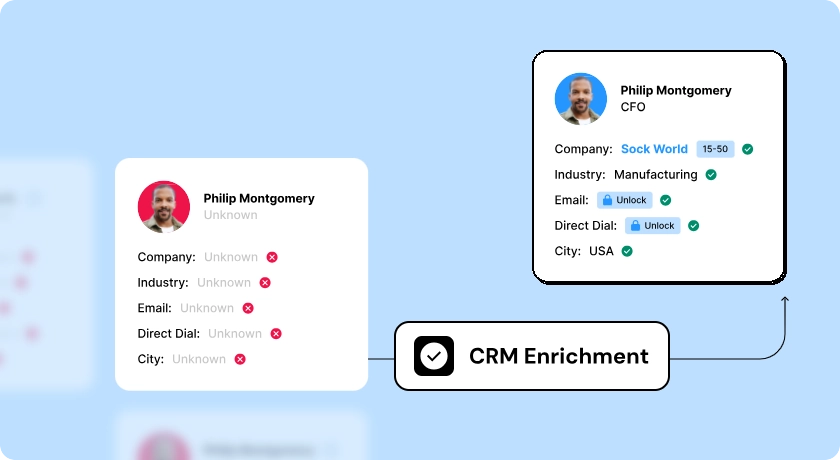
CRM enrichment is the process of adding missing fields, updating stale data, and layering in new intelligence across emails, direct dials, titles, company firmographics, technographics, and intent signals onto existing records. Enrichment is an ongoing process rather than a one-time project. It keeps the database accurate after the initial cleanup. 

The most effective data quality programmes combine both: a structured cleanup to establish a clean baseline, followed by continuous enrichment to maintain it. Cleanup without enrichment produces a database that starts decaying again immediately. Enrichment without a prior cleanup may perpetuate the structure of existing bad records rather than fixing the underlying data quality problems. 

RevOps teams often use this analogy: cleanup drains the swamp, while enrichment installs the water filtration system. You need to do both, and in that order, to end up with reliably clean water. 

How Fresh CRM Data Improves Outbound Sales Performance 

The case against CRM data rot is ultimately a case for what becomes possible when CRM data is accurate, current, and enriched. Here is what GTM teams can expect when they invest in contact data freshness. 

Higher email deliverability and reply rates. When the email addresses in your CRM are verified and current, hard bounce rates drop, sender domain reputation improves, and more of your outreach reaches real inboxes. The downstream effect is higher open rates and higher reply rates, not because your messaging has changed, but because more of it is actually being seen. 

More productive SDR time. When reps can trust that the records in their CRM are accurate, they stop spending time on manual verification and data archaeology. That time gets reallocated to conversations, follow-ups, and research, which are the activities that produce the pipeline. Teams that have addressed CRM data rot consistently report meaningful improvements in SDR productivity, measured in meetings booked per rep per week. 

More accurate and credible personalization. With current titles, accurate company data, and enriched context fields, personalization at scale becomes credible rather than a liability. Reps can reference the prospect’s actual current role, their company’s real situation, and relevant signals that indicate genuine relevance, producing outreach that reads as researched rather than automated. 

Cleaner lead routing and account ownership. When the data fields that drive routing logic are accurate and current, leads and accounts go to the right rep on the first pass. Internal friction around account ownership decreases, handoffs are cleaner, and high-intent moments are acted on immediately rather than after a routing dispute is resolved. 

More reliable pipeline forecasting. With accurate account data, correct contact information, and de-duplicated records, the pipeline view in your CRM reflects the actual state of your revenue process rather than an inflated or distorted version of it. Forecasts become more reliable, and the strategic decisions that depend on those forecasts improve accordingly. 

Faster identification of high-intent buying windows. When CRM records are enriched with real-time intent signals and trigger events, SDRs can identify and act on buying windows as they open, such as a funding round, a leadership change, or a technology migration, rather than discovering them weeks later when the moment has passed. 

How Clodura.AI Helps GTM Teams Fix Stale CRM Records 

How Clodura.AI Helps GTM Teams Fix Stale CRM Records | CRM Data Rot | Clodura.AI

Clodura.AI is built to solve the CRM data rot problem at the operational level. Rather than simply providing a clean database to import, it delivers the verification, CRM data enrichment, and intelligence layer that keep CRM data accurate on an ongoing basis. For GTM teams dealing with the effects of CRM data decay, here is what Clodura.AI brings to the table. 

  • Verified B2B contact data with multi-layer email validation. Clodura.AI applies multi-step verification to its contact database, including mailbox-level email verification that goes beyond syntax and domain checks. When you enrich your CRM with Clodura.AI data, you are adding contacts that have been verified at the point of use, not contacts that were accurate at the time of initial data collection and may have decayed since. 
  • Direct dial validation at the individual level. Phone number data in Clodura.AI is validated as direct dials, not general company switchboard numbers. This means your SDRs are spending their call time in actual conversations with the right people, rather than navigating phone trees or leaving messages that never reach the intended contact. 
  • Real-time buyer intent data. Beyond static contact data, Clodura.AI surfaces active buying signals including funding events, leadership transitions, hiring surges, and technology changes, telling your team when a contact or account has entered a buying window. This transforms the CRM from a historical record of past interactions into a live intelligence layer that surfaces where to focus right now. 
  • Company firmographic and technographic enrichment. Clodura.AI enriches company-level records with current headcount, industry classification, technology stack data, and growth signals. These are the fields that drive accurate segmentation, routing, and ICP targeting. When your CRM’s company data is enriched from an active, continuously updated source, the segmentation and routing logic built on top of it produces accurate outcomes. 
  • AI-powered prospecting workflows that reduce manual data work. Clodura.AI’s AI-powered workflow layer helps SDRs identify high-fit contacts, surface relevant signals, and build targeted prospecting sequences without requiring manual research and verification at every step. The data infrastructure does the work that would otherwise fall to the rep, freeing them to focus on conversations. 
  • CRM enrichment that works with your existing stack. Clodura.AI integrates with the CRM and sales engagement tools your team already uses, meaning data quality improvements flow directly into the systems where your team works every day. The benefit is not just a cleaner database in isolation. It is cleaner data in the specific workflows and views that drive your team’s daily decisions. 

The result is a GTM team that spends less time managing data rot and more time creating pipeline, with the confidence that the records they are acting on reflect reality rather than a picture of their market from eighteen months ago.  

Final Takeaway 

CRM data rot is not an edge case or a technical footnote. It is one of the most pervasive and underappreciated causes of pipeline leakage in B2B sales organizations, and it compounds over time if left unaddressed. CRM records decay quietly as people change jobs, companies restructure, and emails migrate. Over time, outdated records cause bounces, misrouted leads, inaccurate forecasts, and wasted SDR time.

The organizations that take data freshness seriously do not just get cleaner reports. They get more pipeline from the same outreach investment, more productive reps, more reliable forecasting, and a competitive advantage built on the ability to reach the right person, with the right message, at the right time. 

Clodura.AI delivers verified B2B contacts, accurate emails, direct dials, company intelligence, buyer intent signals, and AI-powered prospecting workflows. It helps GTM teams replace stale CRM records with real-time data, create a pipeline, and close more deals.

Book a Demo with Clodura.AI to replace stale CRM records with verified contacts, fresh buyer signals, and pipeline-ready data.

Book a Demo

Frequently Asked Questions

Q1: What is CRM data rot? 

CRM data rot is the gradual decay of contact, company, and account records inside your CRM as the real world changes around them. It occurs when people change jobs, companies restructure, emails become invalid, and records stop reflecting current reality. 

Q2: What is CRM data decay? 

CRM data decay describes the same phenomenon as CRM data rot, referring to the ongoing degradation of database records over time. Experts estimate B2B data decay affects 20–30% of contact records yearly due to job changes, promotions, acquisitions, and email migrations. 

Q3: What is CRM data quality? 

CRM data quality refers to how accurate, complete, current, and usable the records in your CRM are. High-quality CRM data enables reliable outreach, accurate forecasting, clean routing, and effective personalization. Low data quality creates friction and waste across the entire revenue process.

Q4: What are the signs of bad CRM data?

The most common signs include rising email hard-bounce rates, declining reply rates without messaging changes, increasing time SDRs spend on data research, inconsistent lead routing outcomes, and a pipeline that does not convert at expected rates. 

Q5: How does CRM data quality affect outbound sales? 

CRM data quality directly affects email deliverability, personalization accuracy, SDR productivity, and lead routing quality, all of which flow into pipeline output. Teams with clean CRM data book more meetings from the same outreach effort because more of their outreach reaches the right person in the right context. 

Q6: How do you prevent CRM data rot? 

Preventing CRM data rot requires combining a one-time cleanup to establish a clean baseline with ongoing enrichment to maintain it. The most effective approach integrates a data platform like Clodura.AI that continuously verifies, updates, and enriches CRM records so decay does not accumulate.

Q7: How does Clodura.AI help sales teams keep CRM data fresh?

Clodura.AI provides multi-layer email and direct dial verification, real-time buyer intent signals, company firmographic and technographic enrichment, and AI-powered prospecting workflows that integrate directly with your CRM. The result is CRM data that stays current, accurate, and actionable. 

Kapil Khangaonkar is Founder of Clodura.AI and Head of Sales. He has more than 17 years of experience in sales and marketing, having worked in various leadership roles for software companies. Kapil has developed an AI-powered sales data and engagement platform that does the major heavy-lifting to ensure sales professionals never miss any potential opportunities and generate more meetings. Kapil has helped countless businesses transform their sales strategies and achieve unprecedented success.

That little voice telling you that you’re missing out on sales is right.

Sign up now and start closing more deals with qualified prospects than ever before.